Translate

Thursday, January 11, 2018

WMI Explorer 2.0 - including Powershell Code generation

While working with PowerShell you come sometimes to situations you need to control something on the machine not reachable right out of the box. So WMI is the answer to your question. Lots of things you can only trigger by WMI through PowerShell when it comes to automation also in combination with SCCM.

The main pain point is how to find the right thing at the right place. And then how to bring it into a PowerShell query. For both questions an easy answer is WMI Explorer.


As there is a specific script tab to create the needed PowerShell code.
Here as example to figure out the used Processor.


Requirements
Features
  •  Browse and view WMI objects in a single pane of view.
  •  Connect as alternate credentials to remote computers.
  •  Asynchronous and Synchronous mode for enumeration.
  • Method execution.
  • SMS (Configuration Manager) mode providing additional functionality for Configuration Manager.
  • Filter classes and instances matching specified criteria.
  • View classes/instances in Managed Object Format (MOF).
  • Search classes, methods and properties for names matching specified criteria.
  • Run WQL queries.
  • Automatic generation of WQL query for the selected Class/Instance.
  • Automatic script creation (PowerShell and VBS).
  • Highlighting enumerated objects.
  • Display property descriptions and possible enumeration values (if available).
  • Display methods descriptions and parameters.
  • Display embedded property values.
  • Caching enumerated classes/instances.
  • View WMI Provider Process Information.
  • Automatic check for new version.
  • Added option to specify COMPUTERNAME as a parameter and automatically connect.
    Example: WmiExplorer.exe COMPUTERNAME
 DOWNLOAD IT HERE

Monday, November 20, 2017

GPO debug logging

Sometimes you need to search deeper to check why GPOs don't get applied.


Therefore you can enable the debug logging of the GPO client (service).
Please DO NOT FORGET TO DISABLE IT AFTERWARDS!!!

To enable logging in the Gpsvc.log file, follow these step by step guide:

  1. Click Start , click Run , type regedit , and then click OK .

  2. Locate and then click the following registry subkey:
      HKEY_LOCAL_MACHINE\Software\Microsoft\Windows  NT\CurrentVersion

  3. On the Edit menu, point to New , and then click Key .


  4. Type Diagnostics , and then press ENTER.


  5. Right-click the Diagnostics subkey, point to New , and then click DWORD Value .


  6. Type GPSvcDebugLevel , and then press ENTER.


  7. Right-click GPSvcDebugLevel , and then click Modify .


  8. In the Value data box, type 0x30002 , and then click OK .


  9. Exit Registry Editor.


  10. At a command prompt, type the following command, and then press ENTER:

  gpupdate /force

  11. View the Gpsvc.log file in the following folder:

  %windir%\debug\usermode

Note - if the usermode folder does not exist under %WINDIR%\debug\ the gpsvc.log file will not be created. If the usermode folder does not exist, create it under %windir%\debug.


Thanks to CSS for the hint ;-)


Also check this out: https://technet.microsoft.com/en-us/library/cc749336


If you want to go REALLY DEEP then you find here more guidance.
https://mva.microsoft.com/en-US/training-courses/windows-performance-jump-start-8830
 Then you need the Windows Performance Recorder which is tracking EVERYTHING on your system. Be aware this is searching a needle in the haystack as it produces GB's of binary logs!!!

Thursday, October 26, 2017

Serious vulnerability: RSA-Keys generated by Infineon TPMs are Insecure

Normally I do not talk about single security vulnerabilities except there are really serious ones they are a little bit odd and out of the normal security scope (like patching vulnerable windows services which is done automatically during patch days). Here manual interaction is necessary!

Today we talk about a serious one in Infineon TPMs. Its a bug in the firmware implementation which unfortunatelly affects many different models from many different vendors. It is CVE-2017-15361, also referred to as "Return of Coppersmith's Attack" (ROCA).

ATTENTION!  Application of firmware update is not enough! You will need additional steps depending on Microsoft services and functions you used with TPM before!  e.g. Bitlocker, Active Directory etc!!!


Affected are INFINEON TPM chips which are used widely.

Here the MS Security Advisory (on first access you need to accept the EULA. Afterwards you may need to click this link again!!!)
https://portal.msrc.microsoft.com/en-us/security-guidance/advisory/ADV170012

Here is the Infineon Statement
https://www.infineon.com/TPM-update


List of affected models by vendor
(list not complete just major vendors included, but may include already the right firmware update packages by model!)


ACER
https://us.answers.acer.com/app/answers/detail/a_id/51137

Dell (nearly not affected)
http://www.dell.com/support/article/SLN307820

HP (Consumer)
https://support.hp.com/us-en/document/c05792935

HP (Enterprise Support)
https://support.hpe.com/hpsc/doc/public/display?docId=emr_na-hpesbhf03789en_us

Lenovo
https://support.lenovo.com/us/en/product_security/LEN-15552

Fujitsu
http://www.fujitsu.com/global/support/products/software/security/products-f/ifsa-201701e.html

Toshiba
http://go.toshiba.com/tpmsecuritynotice


Known affected vendors (by 10/24/2017)
(for newer informations check the CVE above again!)
  • Atos SE
  • Dell
  • Fujitsu
  • Gemalto AV
  • Google
  • Hewlett Packard Enterprise
  • Infineon Technologies AG
  • Lenovo
  • Microsoft Corporation
  • Rubrik
  • WinMagic
  • Yubico

Microsoft Devices affected:

If your hardware is a Surface device, firmware updates are yet not available as of October 10, 2017. Microsoft is working to make firmware updates available for following affected devices and will provide links to the updates when they become available.

  • Surface Book
  • Surface Pro 3
  • Surface Pro 4
  • Surface Studio
  • Surface Hub
Note that the Surface 3, Surface Laptop, and the Surface Pro released in June 2017 are NOT affected by this vulnerability.

To check your own machine:
  1. Apply the latest MS October 2017 kummulative patch!
  2. Open "TPM.msc" 
  3. Check for the Status entry


Additional steps are needed!
Checkout therefore the Microsoft Advisory in section "Recommended Actions!"
https://portal.msrc.microsoft.com/en-us/security-guidance/advisory/ADV170012


special thanks to Andreas Erber which brought me to attention of this!

Friday, September 15, 2017

Bitlocker recovery without MBAM and AD

Some of you may miss Bitlocker Active Directory Recovery. This feature was skipped in 1607 (!).
Reference: https://docs.microsoft.com/en-us/windows/device-security/tpm/backup-tpm-recovery-information-to-ad-ds

So you need MBAM instead. Which is in general a good idea.

But for MBAM in general you need MDOP under SA. And there is a constellation where you cant get MBAM normally when buying Windows under CSP.

There is as always a solution. Recovery key out of the Azure AD Box :-)


Pieter Wiegleven had here documented the full solution:
https://blogs.technet.microsoft.com/home_is_where_i_lay_my_head/2017/06/07/hardware-independent-automatic-bitlocker-encryption-using-aadmdm/

Have fun!

Solution for blurry screen when docking notebook

I got my new surface book and docking station and thought this will boost my 2x27 inch screens. After docking my notebook I got a very blurry experience. After some research I found a solution. The reason are wrong settings you can easily fix. This solution is not limited to surface books. ;-)

Before:


After:

Solution:
You need to make the external monitor as "main display".
Also you need to sign of and on again while you are connected.
After this your screen should be crisp and clear.

Monday, September 4, 2017

Windows Defender Application Guard (updated)

With the new release of Windows 10 - 1709 there is a great new feature out called "Windows Defender - Application Guard"

The idea is to limit the access to the system by isolating the browser experience and lock in hackers potentially using the browser to enter the system.
 
This feature let your Edge browser run in a VM for unknown websites. You will not experience a VM startup. It just feels like a "different private mode" in your browser.

A good idea - how it works behind the scenes - can be found in this video:

 
End-users know the difference by a visual representation.


You can manage it through GPOs telling which trusted websites (e.g. organizational websites) should be open in Edge normally also using the full set of Win32 APIs.

All other websites would be opened in the sandboxed version of Edge. The sandboxing is realized also by Hyper-V virtualization. It includes a kernel with a limited set of Win32 APIs to make it even harder to break in. But even if it is possible to break in the attacker is locked in the virtualization layer. When you close the browser the threat is also gone. As this is a non persistent environment.

Additionally this is tied into Windows Defender Advanced Threat Protection. So you get even notified if someone tried to compromise your environment.


To get more information's on this checkout this site.
https://blogs.windows.com/msedgedev/2016/09/27/application-guard-microsoft-edge


And to get the FULL CURRENT (1709) holistic Microsoft Security view. Please checkout this recent video. Which covers more than just Application Guard which is one brick in a bigger wall.


To enable it is relatively simple (depending HW reqs.)
 
But you need to fulfill the requirements:
 
  • Windows 10 Enterprise SKU only
  • PC must support Hyper-V (some older PCs may not support Hyper-V or have this feature disabled in BIOS)
  • Windows Defender Application Guard is Off by default, it must be enabled manually or by policy
  • Hardware Limits:
    • Min. 4 (!) logical processors (E.g. Dual Core + Hyperthreading etc.)
    • Min. 8 GB RAM
    • Min. 5 GB HDD Disk
    • When you follow these limits and you enable GuestVirtualization in the Hyper-V (only possible via Powershell) then it works also in a VM.
Otherwise the feature is greyed out!
 
Currently WDAG reacts a bit tricky with Updates. So it worked in 16299.19 in English-US version of Windows. Update KB4043961 broke the feature so you need to dismiss this update. Also other languages may not work right away. But in later version onwards 17035 is also starts to working in German again.
 
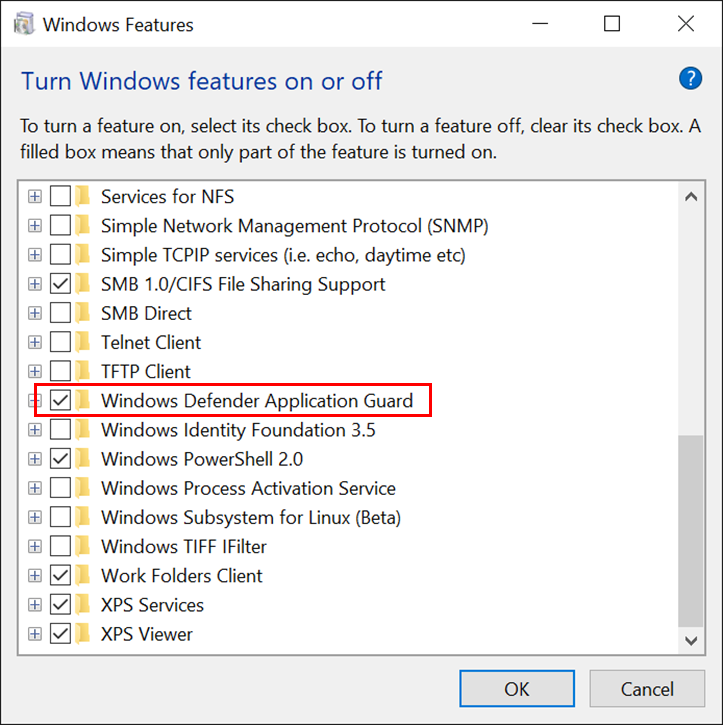
1. You need to enable Windows Application Guard in the "Windows Features"
 
WDAG Turn on and off features.png
 
2. You need to setup the Policies for WDAG (very important!)
  • Network Isolation Policies (defining whats enterprise network)
    Computer Configuration\Administrative Templates\Network\Network Isolation
  • Application Guard Policies (defining WDAG behaviour)
    Computer Configuration\Administrative Templates\Windows Components\Windows Defender Application Guard
More about the policies you find here:

Tuesday, August 22, 2017

Corporate settings - custom default background

One of my customer recently asked me how to preset the default backgrounds to more corporate like backgrounds. After some investigation I found how to change this.

Checkout here the Reg Key and Folders:
The first of the five pictures is the CURRENT background which is stored in another folder as the HISTORICAL ones.


You need to modify the pictures in these folders:

C:\Windows\Web\Wallpaper\Windows -> This is the current img0.jpg (the blue Windows logo)
C:\Windows\Web\Wallpaper\Theme1 -> here you find the history of last used pictures. This will change during usage. 

The responsible Registry key is: 
HKEY_CURRENT_USER\Software\Microsoft\Windows\CurrentVersion\Explorer\Wallpapers

Keep in mind that this CURRENT USER registry key need to be either modified due to the default profile.

But I would recommend to keep the registry key as it is and simply replace the corresponding files img0.jpg in the Wallpaper\Windows folder and the files img1.jpg, img2.jpg, img3.jpg img4.jpg in Wallpaper\Theme1 folder. Please keep in mind the Theme1 folder is hidden!