As Microsoft had a ton of portals this Website might be useful for you.

Microsoft is now offering a free and maintained OpenJDK package!

The Microsoft Build of OpenJDK is a no-cost distribution of OpenJDK that's open source and available for free for anyone to deploy anywhere.
It includes Long-Term Support (LTS) binaries for Java 11 and Java 17 on x64 server and desktop environments on macOS, Linux, and Windows, AArch64/ARM64 on Linux and Windows, and binaries for macOS on Apple Silicon (AArch64/M1). Additionally Java 16 is also provided (non-LTS).
The Microsoft Build of OpenJDK binaries are based on OpenJDK source code, following the same build scripts used by the Eclipse Adoptium project and tested against the Eclipse Adoptium Quality Assurance suite (including OpenJDK project tests).
More you can learn from here:
https://docs.microsoft.com/en-us/java/openjdk/overview
You can download the OpenJDK packages here:
https://docs.microsoft.com/en-us/java/openjdk/download
With Windows Package manager its in PowerShell:
Search for the OpenJDK version:
winget search Microsoft.OpenJDK
To Install the corresponding version its:
winget install Microsoft.OpenJDK.17


Windows Performance Recorder (WPR),
which is used to record the performance in a binary ETW file. (Event Trace for Windows).
Windows Performance Analyzer (WPA),
which is used to examine the ETW file generated by the WPR.
These tools are extremely helpful to nail down the root cause for performance issues. Nevertheless they are not really designed for newbies and you need a solid understanding of the Windows architecture to deal with them.
See it more likely as a combined super ProMon & Process Explorer on steroids.
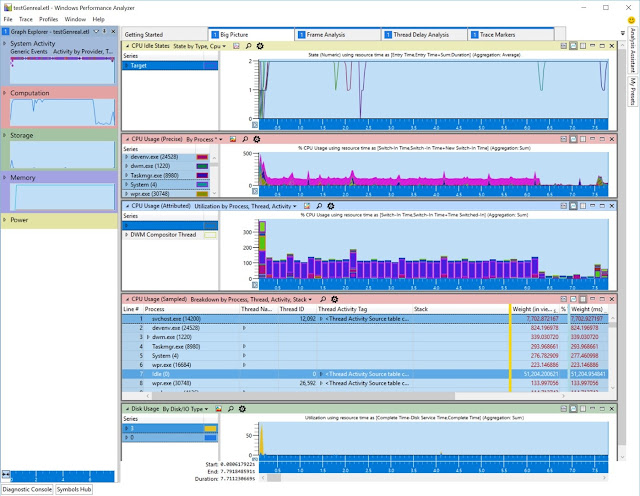
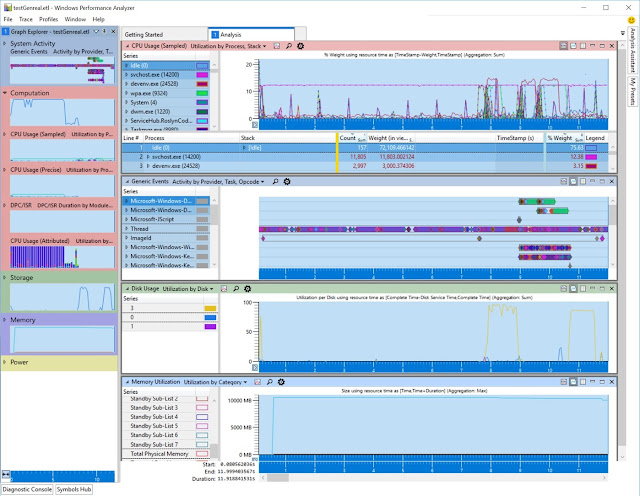
This Build Conference video here is explaining the toolset with demos.
Other cool side effect the WPA can open any ETL file. So if you do some other tracing with built-in tools creating ETL files you can open them with WPA either.
Also checkout the rest of the comprehensive WPA/WPR resources on docs.microsoft.com
Actually the learning curve is very steep. Especially if you try to catch up with a series of videos. There was a pretty good one in the old & retired Microsoft virtual academy with 8 hours of content (Chell Sterioff & Milad Aslaner). There is paid copy available via: Windows Performance Jump Start (trainingvideocenter.com)
But a book might be better to dig deeper into this matter. Fortunately Michael Milirud and Alex Kirshenbaum wrote a new book about it. Actually Michael you already met in the build 2011 video above. ;-)
So checkout their new book here: Fundamentals of… by Alex Kirshenbaum et al. [PDF/iPad/Kindle] (leanpub.com)
When it comes to deal with different identities in the browser (Edge Chromium) then its sometimes hard to keep track which one is used in which browser window. To here is my ultimate tip to simplify this.
Simple make use of color themes. Its pretty simple but very effective.
Due to the nature of different functions and also different demo environments I need to keep track which credentials where used where. So the "good old times" of having 2 different browsers (using InPrivate mode there) to have 3 different identities are gone. And also 3 are not enough in our days.
See here mine different ones:


Update from 09/14/2021 (at the end of the article)!
Yeah I know from a timing perspective Windows365 is already here since July 15th 2021. But I had not yet time to write about it. I am glad to be a tester for Windows 365 since October last year. This was the most confidential TAP program we were ever involved. We were even not allowed to talk to German techy Microsofties about it. ;-)

So to make a long story short and demystify the "Windows got streamed to your device" marketing story. Yes it felt like something is "streamed" to your device. But in reality its:

Microsoft announced they will deprecate TLS 1.0 and TLS 1.1 as authentication mechanism in AzureAD. This was already done with Office 365 with less impact. This time the impact will be much bigger!
Reason for this is security as there are serious vulnerabilities out there like Heartblead, POODLE, BEAST and others. Also other major vendors will deprecate the usage of TLS 1.0 and TLS 1.1 as also specified in RFC8996!

Also old on-premises stuff will fail when used in combination with Azure Active Directory e.g. but not limited to:

Recently we had a new strange issue with current Windows versions and PSExec.

If you execute something like PSExec -s -i cmd.exe
which is creating a CMD under local system context you may receive an error like this