Translate

Wednesday, December 8, 2021

Windows Performance Analyzer (WPA) & Recorder (WPR)


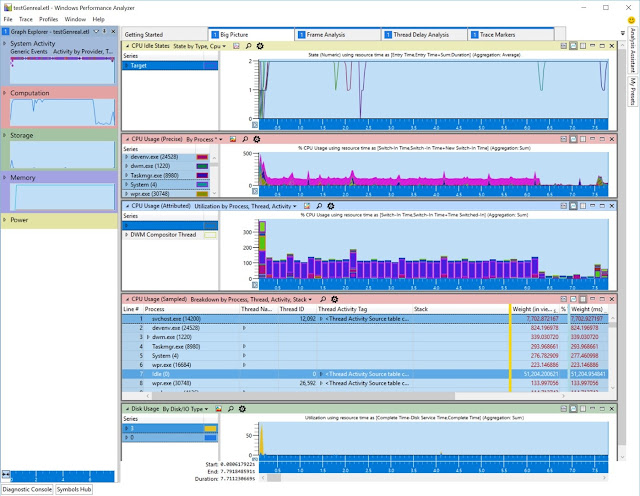
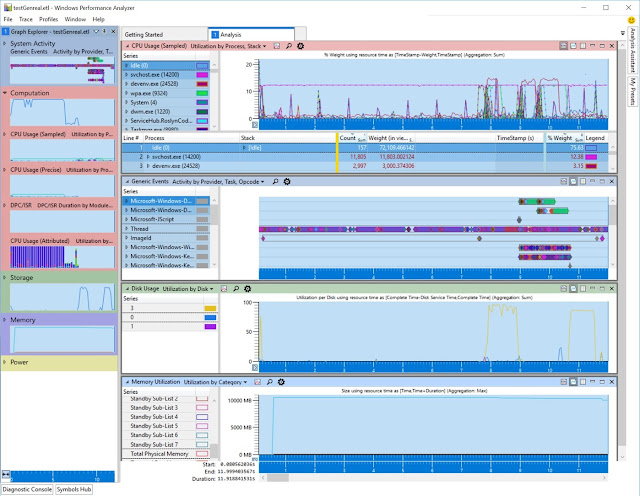
Recently I got a mail from someone who is complaining about bad logon performance on RDS hosts. To diagnose something like this and many other performance related issues it's great to make use of the Microsoft Performance Toolkit which is part of the Windows ADK.


It contains 2 important tools:

Windows Performance Recorder (WPR),
which is used to record the performance in a binary ETW file. (Event Trace for Windows).

Windows Performance Analyzer (WPA),
which is used to examine the ETW file generated by the WPR.

These tools are extremely helpful to nail down the root cause for performance issues. Nevertheless they are not really designed for newbies and you need a solid understanding of the Windows architecture to deal with them.

See it more likely as a combined super ProMon & Process Explorer on steroids. 


This Build Conference video here is explaining the toolset with demos.


Here is a good tutorial to start with. 

Other cool side effect the WPA can open any ETL file. So if you do some other tracing with built-in tools creating ETL files you can open them with WPA either.

Also checkout the rest of the comprehensive WPA/WPR resources on docs.microsoft.com

Actually the learning curve is very steep. Especially if you try to catch up with a series of videos. There was a pretty good one in the old & retired Microsoft virtual academy with 8 hours of content (Chell Sterioff & Milad Aslaner). There is paid copy available via: Windows Performance Jump Start (trainingvideocenter.com)

But a book might be better to dig deeper into this matter. Fortunately Michael Milirud and Alex Kirshenbaum wrote a new book about it. Actually Michael you already met in the build 2011 video above. ;-)

So checkout their new book here:  
Fundamentals of… by Alex Kirshenbaum et al. [PDF/iPad/Kindle] (leanpub.com)

Tuesday, November 30, 2021

Easy dealing with different identities in Edge Chromium

When it comes to deal with different identities in the browser (Edge Chromium) then its sometimes hard to keep track which one is used in which browser window. To here is my ultimate tip to simplify this. 

Simple make use of color themes. Its pretty simple but very effective.

Due to the nature of different functions and also different demo environments I need to keep track which credentials where used where. So the "good old times" of having 2 different browsers (using InPrivate mode there) to have 3 different identities are gone. And also 3 are not enough in our days.

See here mine different ones:


How to make this working? - Simply select the color themes in the browser settings.


This is very simple, safe and effective. Just try it. I won't miss it now!

And yes what you see in the first screenshot isn't a leak. Now its official that Win365 Enterprise gets also AAD Only (now in private preview but officially announced.)

Friday, August 27, 2021

Windows365 is there

Update from 09/14/2021 (at the end of the article)!

Yeah I know from a timing perspective Windows365 is already here since July 15th 2021. But I had not yet time to write about it. I am glad to be a tester for Windows 365 since October last year. This was the most confidential TAP program we were ever involved. We were even not allowed to talk to German techy Microsofties about it. ;-)

So to make a long story short and demystify the "Windows got streamed to your device" marketing story. Yes it felt like something is "streamed" to your device. But in reality its:

  1. A Microsoft managed virtual machine 
  2. Sitting on Azure
  3. Dedicated for you
  4. Running all the time
  5. Enabled for regular management with Microsoft Endpoint Manager
  6. Part of your your own domain (hybrid domain joined, Azure AD only is on the roadmap)
  7. Paid on a single flat price (n $ per month)
  8. Accessed via RDP protocol on any device (Windows, IOS, macOS, Android, Browser, Linux)
  9. Very simple to setup and maintain!
And it is for whom?

Actually its not a default device you would give everybody in the whole company. But its a great complementary solution for specific use cases and that could be:

  • Regulated scenarios like banking, healthcare, government (outside of Germany ;-))
  • Changing demands like mergers & acquisitions, temps, contractors or partners
  • Bring your own device scenarios (very popular e.g. in Switzerland)
  • New hires (day one) until you get your real device
  • Device shortages (while you wait until your new or replacement device is there)
  • Working scenarios like retail workers or call center.
  • Special LOB applications
  • Design  & Development (even with hardware accelerated VMs for CAD)
  • Software testing
  • Pandemic situations

You may have heard of Azure Virtual Desktop. How is that related to Win365?


To learn more about it I gave 2 webcasts including demos:

GERMAN webcast held with my colleague Karsten Kleinschmidt in our own glueckkanja-gab AG webcast studio.
YOUTUBE - Windows 365 Cloud PC - German

ENGLISH webcast held with Ragnar Heil together from home office & vacation bus ;-)
YOUTUBE - Windows 365 Cloud PC - English


Pricing and plans are found here:
Windows 365 Plans and Pricing | Microsoft


Windows 365 Documentation found here:
Windows 365 Enterprise documentation | Microsoft Docs

And yes there is also a Business version available. Difference here:
  1. Azure AD only
  2. No network connection to on-premises
  3. No custom images
  4. Limited to max 300 users
So not really an option a larger enterprise would think of.

If you want to know what's new and currently available:
What's new in Windows 365 | Microsoft Docs

If you are interested in what's coming next then look here:
In development - Windows 365 | Microsoft Docs

In another post later I will talk about tips & tricks for deployment & troubleshooting. Stay tuned!

PS: Microsoft stopped the trial temporary due to overwhelming success and a large amount of requests for it. You can still "try" with a paid subscription. If you are seriously interested then the probably 32 US$ per month aren't too much for a paid test machine.

(UPDATE 9/14/2021):
To get a first glimpse here you get access to a interactive demo experience!
Interactive Demo (azureedge.net)

And if you want to see current feature requests, upvoting or adding a new one.
Windows 365 feature requests - Microsoft Tech Community

Tuesday, May 4, 2021

MS deprecates TLS 1.0 and TLS 1.1 in AzureAD

Microsoft announced they will deprecate TLS 1.0 and TLS 1.1 as authentication mechanism in AzureAD. This was already done with Office 365 with less impact. This time the impact will be much bigger!

Reason for this is security as there are serious vulnerabilities out there like Heartblead, POODLE, BEAST and others. Also other major vendors will deprecate the usage of TLS 1.0 and TLS 1.1 as also specified in RFC8996!

The MS cloud application catalog is reporting already more than 2.700 apps from the 17.000 apps not supporting TLS 1.0 or TLS 1.1.  If Azure AD is used for authentication for one of the affected apps they may fail after June 30th 2021!

Also old on-premises stuff will fail when used in combination with Azure Active Directory e.g. but not limited to: 

  • Use of outdated operating systems (Windows 7 / Window 8 without "extension", Servers older as Windows Server 2012 R2
  • Use of outdated browsers (used for app compat reasons)
  • New AzureAD device registration on older OSes
  • Older Versions of Azure AD connect, PTA agents oder AppProxy connectors
  • MFA extensions on ADFS servers with older OSes
  • NPS extensions for Azure MFA on older OSes
  • Azure AD integrated applications and PowerShell scripts based on older .Net Framework version not configure for use of TLS 1.2
  • Software as a Service (SaaS) applications or other Line of Business applications hosted on platforms without TLS 1.2 support
  • Webproxy with SSL inspection which are not supporting TLS 1.2
This list may not be complete but should show the full impact on this!

How you can solve this issue in certain scenarios you find here more information's:


You can do some testing on this also on: https://www.ssllabs.com/ssltest/
(Please keep in mind that more than one URL might be involved in an authentication process!)


If you have Microsoft's Cloud App Security you find with this advanced filter all the affected software!


And last but not least you can find for all authentications on your tenant a report showing outdated authentications. How reliable this report is, judge on your self in your environment. We found still some strange reports.

TLS deprecation report (every 2 days you see a new one. You only see the last 3 reports!)
https://servicetrust.microsoft.com/AdminPage/TlsDeprecationReport/Download

Wednesday, January 20, 2021

PSexec failing with no process on the other end of the pipe

Recently we had a new strange issue with current Windows versions and PSExec.


If you execute something like PSExec -s -i cmd.exe 

which is creating a CMD under local system context you may receive an error like this

Error communicating with PsExec service on [MACHINE_NAME]:
No process is on the other end of the pipe.

Solution: Simply update PsExec to the latest version!
Minimum here is 2.32!

Monday, January 11, 2021

Surface device - driver and firmware support lifecycle

Recently a friend ask me for an updated driver for an issue with an older device in the surface family. So I thougth it would be a good idea first to check if the device is still supported. As we have the row of devices now for a couple years.


The good news were the devices up to Surface 3 are still under "firmware and driver" support. So in this case I could open a case for this driver issue and still believe it may be served. Actually its not a guarantee that PG agrees with my issue and will fix it. But there is some how a legal basis for it according to their own support policies.

Checkout here the list!

DeviceRelease DateEnd of Servicing Date
Surface RT1October 26, 2012April 11, 2017
Surface Pro1February 9, 2013April 11, 2017
Surface 21October 22, 2013April 10, 2018
Surface Pro 21October 22, 2013April 10, 2018
Surface Pro 3June 20, 2014November 13, 2021
Surface 3May 5, 2015November 13, 2021
Surface BookOctober 26, 2015November 13, 2021
Surface Pro 4October 26, 2015November 13, 2021
Surface Book with Performance BaseNovember 10, 2016November 13, 2021
Surface Studio (1st gen)December 15, 2016November 13, 2021
Surface Laptop (1st gen)June 14, 2017November 13, 2021
Surface Pro (5th gen)June 15, 2017November 13, 2021
Surface Book 2November 17, 2017November 17, 2021
Surface Pro LTE (Model 1807)December 1, 2017December 1, 2021
Surface GoAugust 2, 2018August 2, 2022
Surface Studio 2October 2, 2018October 2, 2022
Surface Laptop 2October 16, 2018October 16, 2022
Surface Pro 6October 16, 2018October 16, 2022
Surface Go with LTE AdvancedNovember 20, 2018November 20, 2022
Surface Laptop 3October 22, 2019October 22, 2023
Surface Pro 7October 22, 2019October 22, 2023
Surface Pro XNovember 5, 2019November 5, 2023
Surface Go 2May 6, 2020May 6, 2024
Surface Book 3May 26, 2020May 26, 2024
Surface Pro X SQ2October 13, 2020October 13, 2024
Surface Laptop GoOctober 13, 2020October 13, 2024

1. Indicates devices with a previously declared end of firmware/driver servicing support date.


More details especially also the differentiation on device support and OS version support you will find here: https://docs.microsoft.com/en-us/surface/surface-driver-firmware-lifecycle-support


To dig deeper its also very helpful to checkout the surface update history which is found here: https://support.microsoft.com/en-us/help/4036283

Saturday, December 5, 2020

Why a former open source fan trusts in Microsoft and their secure data handling

In the beginning of my IT "career" in mid-80's I was a open source fan and had bad prejudices against Microsoft. For me this was a huge "bad" US corporation and in these days it sounded also bad to pay money for software. Especially for kids having just their small pocket money. So illegal software copies were very widespread. Also people did not understand the concept of intellectual property in software these days. May be also as it was just too easy to make a simple copy of a program. Nobody was missing something (like it was physically stolen) as you made a copy out of "nothing".

Later on I was working as CAD administrator in my first job. There we also had Unix systems (Silicon Graphics IRIX, IBM AIX and still the evil Windows 3.1/3.11). Followed in my next job as 2nd level supporter for a SIEMENS affiliate company we used SCO Unix and Linux together with the (still evil) Windows 95/ NT 4.0. I loved Linux for the open source concept. Making things available for all for free.


But one day in my IT career a consulting company offered me a job to work as vendor lab engineer for (the big evil) Microsoft Corporation near Munich (Unterschleissheim). It took a while to think about it. I had so many (pre-)judices against them. But I realized I need to find out myself if I was right or wrong!

Until then I only got in contact with some Microsoft sales men and in these days these guys were very snobbish. At least it felt like snobbish. But I was willing to give it a chance and may be correct myself.

After a few weeks I realized the big difference between my thoughts and the reality. The tech guys there were as cool as the open source guys. Same techy mindset and all very open and friendly. But there was also this other difference which I understood better by then. Microsoft's techies realized they have to pay their bills at the end of each month for their houses, cars etc. So there was really a a very good justification for paying money for software. Actually this also paid my own bills :-$

So this was my personal conversion from a Linux open source minded "Saul" to a Microsoft/Windows minded "Paul"!

But when it comes to data protection (which is the origin topic of this article) then there is even a different story to tell. And why I absolutely trust in Microsoft's data handling way more than all others. I was one of the "victims" of this data handling. Victim in the sense as I learned on my own hands what does this really means to them!

Many people argue that Microsoft is making money with customers data. As far as I observed this is absolutely not true! Even the opposite is true!

First of all you have to think about different companies and their business models. Many of the "I-give- it-for-free" companies like Google, Facebook, Twitter (just to name a few more prominent) have a business model based on data. 

Rule of thumb is: "Whenever you do not pay for a product - YOU are the product."

Actually this is not bad and also very popular. Most people still like stuff they have not to pay for. But you need to make yourself aware that your personal usage pattern is used for marketing and advertisement purposes. So Google, Facebook and Co. doing their business based on advertisement.

If you use their services you need to accept that! And believe it or not I still use Google for searching.

Whenever you are a data protection officer arguing against Microsoft regarding data handling (obviously without knowing it better) then you also need to be consequent and stop using Google for search in your company!

Microsoft's business model is different. You actually pay for the services. The free stuff there is normally "just" to bind people to the paid stuff. Actually I myself use Office365 Home (for me and my family) and pay for it. I get all the cool new stuff and lots of services for a little price. So I do not care anymore. This meaning they make money with software & services not originally with data (only).

To be fair they are also getting usage data to help them making better advertisement to you (when it comes to Microsoft services) but they do not sell this data. 

To check this out in detail check it here in English or German (Microsoft Privacy statement).

Even Google states that they do not sell your data. They just create advertisement based on your behavior on their platform (or platform "legs" on other websites (with embedded google advertisement frames)) as stated here. As I was not working there I can not judge on this seriously!

Now lets come to Microsoft's internal data handling behavior. And this was even done by myself as how I was instructed to do:

  1. Whenever a customer went into our lab with some sort of personal data we refused it.
  2. If it was necessary we only allowed at least pseudonymized data.
    1. Then the data need to reside on dedicated systems
      (hardware or VMs on dedicated hardware)
    2. Not connected to any IP network
    3. Accessible only by KVM switch (just keyboard, video, mouse extension, no data transmission)
    4. KVM switch only accessible via dedicated VPN into our internal lab network and only from Microsoft corporate network
    5. Data deleted with DoD wipe process (DOD 5220.22-M) afterwards with 5 times writing "trash" on the whole hard disk (certified)
Actually we "feared" real customer / personal data in our lab environment as we had to take it very serious which introduced also a lot of extra work for us!

In my life I have seen many companies handling with data. But none of them was by far so strict as Microsoft is. And in days of GDPR Microsoft take it even more serious. They have today literally a dozen different personal data classifications and different handling instructions.

Also in terms of layered security (starting with access, process data, store data and even data disposal) Microsoft is really THE ultimate model student). And less they can not accept.

Just think of their cyber defense operation center (CDOC) which takes care of all Microsoft's assets on premise an in the clouds (public and private). Or the Microsoft Digital Crime Unit (DCU). They are helping to make the world actively safer every day. Just checkout their current reports.

This is why I absolutely trust in security & secure data handling at Microsoft. They do much more then even my bank does (and I had a IT project with my own bank as well many years ago!)