Translate

Wednesday, April 2, 2025

Edge Browser Troubleshooting Tools

Whenever you are working with Edge Browser in case of troubleshooting you may wonder how to figure out which policies are used or other additional troubleshooting you want to do. Actually Edge browser had a ton of them under the hood that most people do not know about.


The easiest way to get the list of possible functions is type in the browser edge://about

This is additionally to the already known F12 Developer Tools (!)

The link edge://about gives you a pretty long list with these functions:

Edge URL
Description
edge://about
Lists all internal URLs. Same as edge://edge-urls/
edge://accessibility
Inspect the representation of accessibility in Edge and modify accessibility modes.
edge://appcache-internals
Lists information about the application cache (that sites may use).
edge://application-guard-internals
Returns the status of the Windows-specific Application Guard feature, host information, a log, and utilities to check URL trust, Ping, and more.
edge://apps
Lists all applications installed in Microsoft Edge.
edge://autofill-internals
Lists captured autofill logs.
edge://blob-internals
Lists blob data if available.
edge://bluetooth-internals
Provides information on Bluetooth connectivity including available adapters, devices, and debug logs.
edge://compat
Compatibility hub that lists Enterprise Mode Site List entries, User agent overrides, CDM overrides, and the status of Internet Explorer mode (including diagnostics).
edge://components
Installed plugins and components. The Adobe Flash Player version is listed here if installed, as is the Widevine Content Decryption Module, Trust Protection Lists, and other components.
edge://conflicts
The page lists all modules loaded in the browser and rendered processes, and modules registered to load at a later point in time.
edge://crashes
Lists all recently reported crashes. Includes option to clear the listing.
edge://credits
Lists credits for various components and features that Edge uses.
edge://data-viewer
Linked to diagnostic data.
edge://device-log
Provides device information, e.g. events of Bluetooth or USB devices.
edge://discards
Tabs may be discarded by the browser, e.g. to free up memory. The page lists those tabs and related information.
edge://download-internals
Displays the download status, and provides options to start a download.
edge://downloads
Opens the internal downloads management page listing all downloads of Edge.
edge://edge-dlp-internals
Data Loss Prevention (DLP) internals for Edge.
edge://extensions
Lists all installed extensions.
edge://flags
Access to experimental features and settings.
edge://gpu
Provides information about the GPU and related settings.
edge://histograms
Displays histograms of various metrics.
edge://history
Opens the browsing history page.
edge://indexeddb-internals
Provides information about IndexedDB databases.
edge://inspect
Allows inspection of pages and extensions.
edge://interstitials
Lists interstitial pages.
edge://invalidations
Provides information about invalidations.
edge://local-state
Displays the local state file.
edge://media-engagement
Provides information about media engagement.
edge://media-internals
Provides detailed information about media playback.
edge://nacl
Provides information about Native Client (NaCl) modules.
edge://net-export
Allows exporting network logs.
edge://net-internals
Provides detailed network information and settings.
edge://network-errors
Lists network error codes and their descriptions.
edge://new-tab-page
Opens a new tab page.
edge://ntp-tiles-internals
Provides information about new tab page tiles.
edge://omnibox
Provides information about the omnibox (address bar) suggestions.
edge://password-manager-internals
Provides information about the password manager.
edge://policy
Lists all policies applied to the browser.
edge://predictors
Provides information about predictors.
edge://prefs-internals
Displays internal preferences.
edge://print
Opens the print dialog.
edge://process-internals
Provides information about browser processes.
edge://quota-internals
Provides information about storage quotas.
edge://sandbox
Provides information about sandboxed processes.
edge://serviceworker-internals
Provides information about service workers.
edge://settings
Opens the settings page.
edge://signin-internals
Provides information about the sign-in process.
edge://site-engagement
Provides information about site engagement.
edge://suggestions
Provides information about suggestions.
edge://sync-internals
Provides information about sync.
edge://system
Provides information about the system.
edge://terms
Displays the terms of service.
edge://tracing
Provides tracing information.
edge://translate-internals
Provides information about the translation feature.
edge://ukm
Provides information about the UKM (User Keyed Metrics) system.
edge://usb-internals
Provides information about USB devices.
edge://user-actions
Provides information about user actions.
edge://version
Displays the version information.
edge://webrtc-internals
Provides information about WebRTC.
edge://webrtc-logs
Provides access to WebRTC logs.
edge://web-app-internals
Provides information about web apps.
edge://web-contents
Provides information about web contents.
edge://webusb-internals
Provides information about WebUSB.
edge://whats-new
Displays the "What's New" page.
edge://flags
Access to experimental features and settings.
edge://gpu
Provides information about the GPU and related settings.
edge://histograms
Displays histograms of various metrics.
edge://history
Opens the browsing history page.
edge://indexeddb-internals
Provides information about IndexedDB databases.
edge://inspect
Allows inspection of pages and extensions.
edge://interstitials
Lists interstitial pages.
edge://invalidations
Provides information about invalidations.
edge://local-state
Displays the local state file.
edge://media-engagement
Provides information about media engagement.
edge://media-internals
Provides detailed information about media playback.
edge://nacl
Provides information about Native Client (NaCl) modules.
edge://net-export
Allows exporting network logs.
edge://net-internals
Provides detailed network information and settings.
edge://network-errors
Lists network error codes and their descriptions.
edge://new-tab-page
Opens a new tab page.
edge://ntp-tiles-internals
Provides information about new tab page tiles.
edge://omnibox
Provides information about the omnibox (address bar) suggestions.
edge://password-manager-internals
Provides information about the password manager.
edge://policy
Lists all policies applied to the browser.
edge://predictors
Provides information about predictors.
edge://prefs-internals
Displays internal preferences.
edge://print
Opens the print dialog.
edge://process-internals
Provides information about browser processes.
edge://quota-internals
Provides information about storage quotas.
edge://sandbox
Provides information about sandboxed processes.
edge://serviceworker-internals
Provides information about service workers.
edge://settings
Opens the settings page.
edge://signin-internals
Provides information about the sign-in process.
edge://site-engagement
Provides information about site engagement.
edge://suggestions
Provides information about suggestions.
edge://sync-internals
Provides information about sync.
edge://system
Provides information about the system.
edge://terms
Displays the terms of service.
edge://tracing
Provides tracing information.
edge://translate-internals
Provides information about the translation feature.
edge://ukm
Provides information about the UKM (User Keyed Metrics) system.
edge://usb-internals
Provides information about USB devices.
edge://user-actions
Provides information about user actions.
edge://version
Displays the version information.
edge://webrtc-internals
Provides information about WebRTC.
edge://webrtc-logs
Provides access to WebRTC logs.
edge://web-app-internals
Provides information about web apps.
edge://web-contents
Provides information about web contents.
edge://webusb-internals
Provides information about WebUSB.
edge://whats-new
Displays the "What's New" page.

Here an example for policies (type in the address bar simply edge://policy)


Monday, August 5, 2024

Winget supports now offline download - BUT Microsoft Store for business retires at August 15th 2024

Great news on the one hand side including bad news on the other hands side!

Its great to see that the
Winget command download feature is now fully supported! Over 10 months ago Winget got the download support feature. But the store backend was not able to respond upon the requests. This is now fixed.

At the same time Microsoft decided to retire very soon the Store for Business at August 15th 2024. Here in Central Europe we have currently vacation season so this is really a great surprise and pressure for all SCCM admins taking advantage of the Store for Business to download apps. And there are now a ton of apps you have to take care of especially the built-in ones from Microsoft just think of Photos, Paint, New Teams just to mention a few of them.

For the full blogpost see here:
Downloading Microsoft Store apps using Windows Package Manager - Microsoft Community Hub

And for the commands see here:
winget download command | Microsoft Learn

Huge additional challenge for automation is you need a logged in Entra ID account or you get prompted with the standard Entra ID authentication.

You need to have one of these roles:

  • Global Administrator
  • User Administrator
  • License Administrator


And there is still another drawback which is also not easy to fix for Microsoft itself as this information is dependent from software vendors as well. You do not see the version information of the software available from the store. So you may need to download first every couple weeks the potential update and then afterwards check the version as you see the version as part of the downloaded filename only.

Just continue my research how to fully automate this process. So check back soon.

Monday, February 19, 2024

Win11 cumulative update February 2024 (KB5034765) - cant be installed

In February 2024 MS released a very important cumulative update (which is also fixing 2 major Zero-Day-exploits in the OS with the cumulative update KB5034765 as reported by various sources in the internet)

  • CVE-2024-21412 Internet Shortcut Files Security Feature Bypass Vulnerability
  • CVE-2024-21351 Windows SmartScreen Security Feature Bypass Vulnerability
Officially MS is only reporting on their page publicly this update "solves security issues"


While installing theses updates:

  • 2024-02 Cumulative Update for Windows 11 Version 23H2 for x64-based Systems (KB5034765)
and/or 
  • 2024-02 Cumulative Update for .NET Framework 3.5 and 4.8.1 for Windows 11, version 23H2 for x64 (KB5034467)

I failed as many others already trying to install this update.


During the offline mode installing the update I got this message:

Something didn't go as planned. No need to worry-undoing changes.


After the rollback you will see that the update is still waiting for you to be installed.


Resolution is really simple in this case:
  • Check for the hidden folder: C:\$WinREAgent
  • As admin rename it into something else like "C:\DONOTUSE THIS DOLLARWinREAgentFOLDER" or any other name.

And then let the update run again.

When you re-run the update after renaming the folder its very likely that it works.
So far for me and obviously many others they reported the same issue.

After this action my system reported now no new updates and the Windows version was "Build 22631.3155" as expected (winver.exe).

Image Credits: Image created with Dalle2 prompt: man with black suit and black sunglasses is leaning against a large Windows logo. He is leaning from the right side to the left. On the left side a Windows logo is rushing in to the picture and stopped by the man.


Monday, September 25, 2023

SCCM Error Code Bible

SCCM Error Codes – Descriptions and Quick Fixes

Decimal CodeHex CodeDescriptionFix
20x00000002The system cannot find the file specified [prajwaldesai.com], [byskov.com]. This typically indicates a required file or package is missing.- Obtain a fresh copy of the missing installation files (e.g. re-download client setup files from the site server) [prajwaldesai.com].
- Ensure all required content is present in the expected locations before retrying installation.
50x00000005Access is denied [prajwaldesai.com]. The installation process lacks the permissions needed to complete an action.- Run the SCCM installer with administrative privileges on the client (ensure the SCCM service account has local admin rights) [prajwaldesai.com], [mynexttech.com].
- If pushing from the server, verify the client push account has admin access on the target machine.
520x00000034A duplicate name exists on the network [prajwaldesai.com]. (The computer’s name conflicts with another on the network, often a DNS issue.)- Remove or rename any duplicate hostnames in DNS that match the client’s name [prajwaldesai.com], [mynexttech.com].
- Ensure the computer’s name is unique in the domain before retrying deployment.
530x00000035The network path was not found (failed to connect to admin$) [prajwaldesai.com]. This can happen if the admin share is inaccessible (e.g. firewall or service not running).- Enable File and Printer Sharing through the Windows Firewall exceptions on the client [prajwaldesai.com].
- Verify the Server service (for admin$ share) is running and the device is reachable on the network.
640x00000040The specified network name is no longer available [prajwaldesai.com]. (Network connection to the resource was lost during the operation.)- Check network connectivity to the target resource (share or server) [prajwaldesai.com].
- Ensure the resource (e.g. a file share or DP) is still online and accessible, and that no network drop occurred.
670x00000043The network name cannot be found [prajwaldesai.com]. (Name resolution failure or required services are not running on client.)- Verify the client’s hostname can be resolved via DNS [prajwaldesai.com] (update DNS records if needed).
- Ensure necessary services like Remote Registry and File/Printer Sharing are enabled on the client [prajwaldesai.com].
1120x00000070Not enough disk space [prajwaldesai.com]. The target machine does not have sufficient free space for the operation.- Free up disk space on the target machine (SCCM client needs ~100–500 MB for installation) [prajwaldesai.com].
- Clear temporary files or expand the disk volume before retrying the deployment.
10530x0000041DThe service did not respond to the start or control request in a timely fashion [prajwaldesai.com]. (A Windows service needed by SCCM timed out starting.)- Restart the service related to the SCCM client (e.g. ccmexec or ccmsetup) on the client machine [mynexttech.com].
- Check that all dependent services are running and increase the service timeout if persistent.
12030x000004B3The network path was typed incorrectly or does not exist (network provider not available) [prajwaldesai.com]. In practice, this means the client couldn’t find the network location.- Verify the network path in the deployment is correct and reachable by the client [prajwaldesai.com].
- Make sure the client’s network configuration (DNS, firewall) allows access to that path [mynexttech.com].
13960x00000574Logon Failure: The target account name is incorrect [prajwaldesai.com]. Often caused by a mismatch between machine account and AD (e.g. duplicate SPN or old computer object).- Check Active Directory/DNS for a duplicate or stale computer account for the client; remove any duplicates [prajwaldesai.com].
- If the machine’s domain trust is broken, reset the computer account or rejoin it to the domain [mynexttech.com].
16030x000006431603 is a general Windows Installer fatal error (installation failed) [mynexttech.com]. In SCCM client setup logs, it often appears when the CCMExec service couldn’t be stopped [prajwaldesai.com].- Reboot the target machine, then retry the installation (this ensures no SCCM processes are stuck) [mynexttech.com].
- Check MSI logs (ccmsetup.log or client.msi.log) for specific errors, and address any MSI-related issue (e.g., remove previous client remnants) before reinstalling.
17890x000006FDThe trust relationship between this workstation and the primary domain failed (machine account trust broken) [mynexttech.com].- Rejoin the computer to the domain to re-establish trust [mynexttech.com].
- Ensure the system’s clock is in sync with the domain and that the domain controller is reachable.
120020x00002EE2The request timed out while accessing an HTTP resource (WININET error 12002) – for example, an HTTP upload or download timed out [mynexttech.com]. In SCCM, this might occur during content download via BITS.- Check network connectivity for HTTP/HTTPS: ensure the client can reach the SCCM distribution point and that firewall ports (80/443) are open [mynexttech.com].
- If using a proxy or slow link, adjust BITS settings or retry when network conditions improve.
21479424130x8007000DA file needed by Windows Update is corrupted or missing [sccmgeekbl…dpress.com]. This error commonly causes Windows updates (or upgrade task sequences) to fail.- Repair the Windows Update components: run System File Checker (SFC) and DISM to fix corrupted system files [learn.microsoft.com].
- Reset Windows Update (clear SoftwareDistribution cache) and then re-download the update [learn.microsoft.com].
21475000370x80004005Unspecified error (E_FAIL) – a generic failure with no specific message [learn.microsoft.com]. In SCCM logs, 0x80004005 appears when an operation fails without a detailed error (it can indicate anything from network issues to access denied, depending on context).- General troubleshooting: check SCCM logs (e.g. SMSTS.log, AppEnforce.log) to find the underlying error message since 0x80004005 itself is generic [nextofwindows.com].
- Verify there are no obvious issues like firewall blocks, misconfigured client settings, or permission problems that could cause a generic failure [nextofwindows.com], [nextofwindows.com].
21479435170x8007045DAn I/O device error occurred (e.g. disk I/O failure). In SCCM context, this often shows up when the client’s WMI repository is inaccessible or can’t be written (WMI namespace creation failed) [mynexttech.com].- Rebuild the WMI repository on the client: remove or rename the existing repository (or the CCM namespace) and let it regenerate [mynexttech.com].
- Check the disk health on the client (bad sectors or disk errors can cause 0x8007045D) and ensure the SYSTEM account can write to WMI.
21479441220x800706BAThe RPC server is unavailable [prajwaldesai.com]. The client could not connect via RPC (for example, WMI calls to a remote machine failed).- Make sure the Windows Firewall isn’t blocking RPC – open ports like TCP 135 and enable the “Remote Administration” exception [prajwaldesai.com].
- Verify the WMI service is running on the target and not corrupted (reinstall/repair WMI if RPC calls still fail) [mynexttech.com].
21477499470x8004103BWMI generic failure: WMI namespace creation failed [prajwaldesai.com] (often due to insufficient resources on the client, e.g. low disk space for WMI).- Free up disk space on the client (clear temp files, etc.) and reboot the machine [prajwaldesai.com].
- If WMI is broken, recompile the WMI repository. After freeing resources, retry the SCCM operation that failed.
22785561810x87D00215Failed to get DP locations from the MP (no distribution point could be found) [techuisitive.com]. This often indicates the client is outside any boundary for content or the content is not distributed.- Ensure the client’s network location is added to an SCCM Boundary and that it’s included in a Boundary Group with an associated Distribution Point [techuisitive.com].
- Distribute the content to the appropriate DP if not already done, then refresh policy on the client and retry.
22785571910x87D00607The software distribution failed because content was not found by the client [learn.microsoft.com]. Common causes are misconfigured boundaries (client can’t find a source) or content removal. (In some cases, it can also indicate user permission issues or network errors.)- Verify the application/package is distributed to the correct DP, and that the client’s boundary group is correctly configured for content location [learn.microsoft.com].
- Check that the client can communicate with the DP (no firewall blocking BITS/HTTP) [learn.microsoft.com], and review AppEnforce.log on the client for specific errors [learn.microsoft.com].
22785572840x87D00664Updates deployment was cancelled by SCCM because it exceeded its maximum runtime [sccmgeekbl…dpress.com]. (The update installer was stopped since it ran too long.)- Re-deploy or run the update again on the client (the previous attempt was canceled) [sccmgeekbl…dpress.com].
- If the max run time is too low, adjust the Maximum Run Time setting for that update deployment in SCCM so it doesn’t timeout prematurely.
22785566730x87D01201Not enough space in cache or disk for the application (Cache size too small) [sccmgeekbl…dpress.com]. The SCCM client’s cache or disk ran out of space during app install.- Increase the SCCM client cache size in the Configuration Manager applet or deploy a policy to enlarge it, then retry the installation [sccmgeekbl…dpress.com].
- Free up disk space on the client if the entire disk is low on space. The deployment will resume once space is available.
22785563180x87D0029ECCMSetup failed – generic client install failure. This is a non-specific error indicating the client installation did not complete (often logged after other errors) [mynexttech.com].- Repair WMI on the client (WMI issues are a common cause for generic CCMSetup failures) and then run the client installation again [mynexttech.com].
- If not WMI, run CCMSetup with verbose logging and examine ccmsetup.log to find the preceding error (address that root cause).
22785561990x87D00227Functionality disabled – client installation is blocked due to a metered network connection [prajwaldesai.com]. (By default, SCCM client won’t install over a metered link.)- Re-run the client setup with the /AllowMetered switch to permit installation on a metered connection [prajwaldesai.com], [prajwaldesai.com].
- Or, configure SCCM Client Settings to Allow client communication on metered networks and wait for the policy to apply, then retry the install [prajwaldesai.com].

MSIX - all-in-one-page

The new Microsoft Packaging format MSIX is now out for quite a while. And it improves over time even. It had its heritage in the old AppV format originally coming from Softgrid which was an Microsoft acquisition of Softricity back in 2006. 

The principle is to sandbox an application from the system. So each application had its own virtual registry and filesystem. Everything there will "overwrite" which is already present in the OS or append when it is not part of the OS.

The OS registry and filesystem is not changed. The virtual registry and filesystem lives in a layer between the app and the OS and is "wrapped" with the app. So the OS is not aware of all the content of the virtual registry and filesystem.

Credits: DALL-E 2 and myself :-)


Key features

  • Reliability. MSIX provides a reliable install boasting a 99.96% success rate over millions of installs with a guaranteed uninstall.
  • Network bandwidth optimization. MSIX decreases the impact to network bandwidth through downloading only the 64k block. This is done by leveraging the AppxBlockMap.xml file contained in the MSIX app package (see below for more details). MSIX is designed for modern systems and the cloud.
  • Disk space optimizations. With MSIX there is no duplication of files across apps and Windows manages the shared files across apps. The apps are still independent of each other so updates will not impact other apps that share the file. A clean uninstall is guaranteed even if the platform manages shared files across apps.

Highlights

  • Package existing Windows apps. Use the MSIX Packaging Tool to create an MSIX package for any Windows app, old or new. The MSIX packaging tool streamlines the packaging experience, offering an interactive user interface or command line to convert and package Windows apps.
  • Install MSIX app packages. Use App Installer to install or update any MSIX app package that is locally available or on any content distribution network.
  • Apply run time fixes to packaged apps. The Package Support Framework is an open source kit that helps you apply fixes to your existing desktop app when you don't have access to the source code, so that it can run in an MSIX container.
  • Use MSIX anywhere. With the open source MSIX SDK, MSIX packages are more versatile, and platform independent. The SDK provides all of the APIs needed to verify, validate, and unpack an app package on any platform, including Windows 10 and non-Windows 10 platforms.

Source and to learn more about the format checkout this page:
What is MSIX? - MSIX | Microsoft Learn´

Great tools to do the packaging are:

1. Microsoft Packaging Tool:
MSIX Packaging Tool Overview - MSIX | Microsoft Learn

2. Another great 3rd party tools is coming from Advanced Installer.
https://www.advancedinstaller.com
There checkout especially the new free express edition:
Advanced Installer Express Edition

It complement's the MSIX packaging tool from MS with:

  • Shortcut arguments
  • One-click digital signature support
  • Detection of high-level constructs, like file type associations or firewall rules and mapping those entries accordingly in the AppXManifest file
  • PSF (Package Support Framework) integration
  • Generate a conversion project: reload, edit and rebuild your MSIX package in seconds
  • Build MSIX and MSI/EXE packages from the same project

Important and helpful tools even from 3rd party checkout here:

3. "Hover" this is a great FREE tool to work on the application virtualization layer from within the package. Which is normally hard to reach. Checkout this great free tool from AdvancedInstaller

Hover: Launching apps inside a MSIX/App-V container (advancedinstaller.com)

4. "MSIX Troubleshooter" this is another great FREE tool from Advanced Installer team to support troubleshooting of MSIX packages. Checkout another great free tool from Advanced Installer
Troubleshooting MSIX installations (advancedinstaller.com)

5. And whenever you need even more tweaks you can benefit from the Package Support Framework (PSF) which is an open source community project to further tweak the MSIX format and circumvent issues as we did in the good old days of Windows 7 App compat shims.

5.1 Overview: Framework zur Paketunterstützung (Package Support Framework, PSF) - MSIX | Microsoft Learn

5.2 Source: Releases · microsoft/MSIX-PackageSupportFramework (github.com)

5.3 GUI supporting configuration of PSF TMurgent-PsfTooling - Microsoft Store Apps (Kudos to Tim Mangan to support this great tool!)

Happy MSIX-packaging!


Monday, May 8, 2023

Microsoft cloud logins - errors and how to get more details

Sometimes when logging in you might see errors like this containing this so called "Correlation ID".


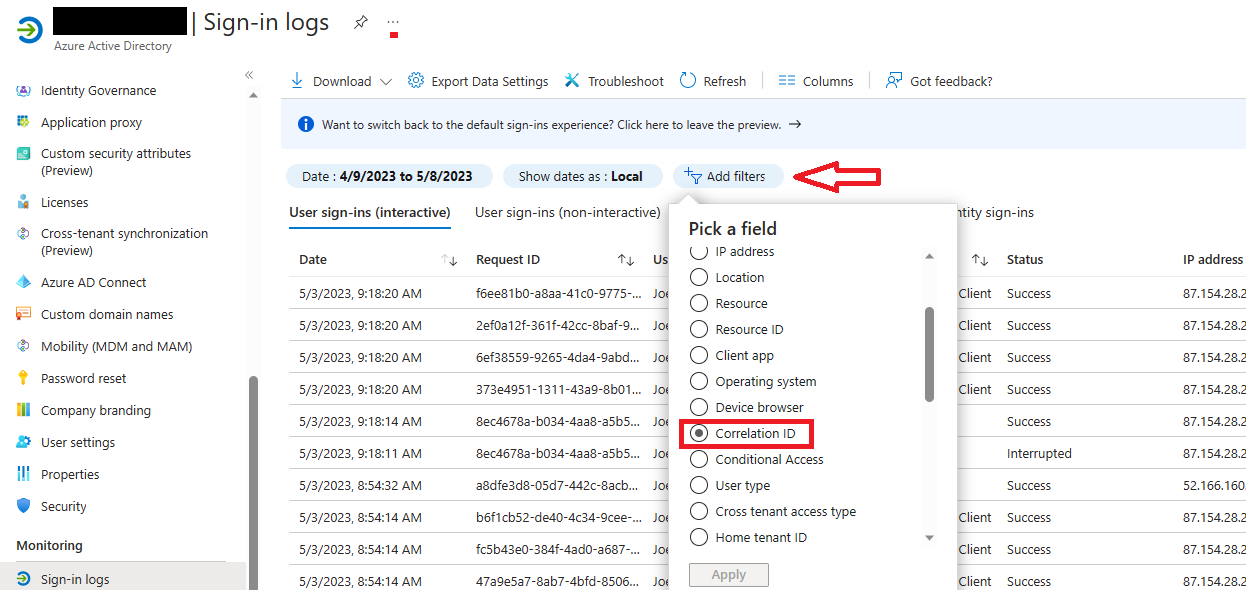
You may wonder where you may find the corresponding log entries with more details on the Azure AD side? The answer helping you is the "Correlation ID".

That's what it does. It correlates your frontend issue with the backend logs.

Here you should have a closer look. And use the filter for the correlation ID. So its always a good Idea to copy the info to the clipboard and advise your users to send you this information.

How to do this:

  1. Open the Azure AD admin page
  2. Open the "Sign-in logs"
  3. Filter for the "Correlation ID" and click apply.
  4. Add in the new filter the Correlation ID info you copied first.
    Its a long Guid formatted number.
 

Also very helpful is this reference table for the Error Codes (AADSTS...)
Azure AD authentication & authorization error codes